
Remove the close icon from Select2 plugin
Introduction
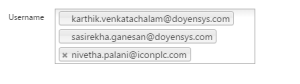
The purpose of this post is to remove the close icon from the select2 plugin for the value which comes from Item Source.
Challenges faced:
Select2 is an external plugin for selecting multiple values at a time. On default, the plugin doesn’t have any option to remove the close icon.
Steps to follow
Step 1: Create a a page level item
Step 2: Created a dynamic action with event as on Page load and called a JavaScript
function.
Step 3: Added JavaScript below code in the page header
Code:
function remove_close()
{
var a=$(“#P94_ROLE”).val();
//alert(a);
if (a.length!=0)
{
var numbers = a.toString().split(‘,’);
for(var i = 0; i < numbers.length; i++)
{
var b=numbers[i];
$(“ul.select2-choices li”).each(function(){
var s= $(this).text();
s=s.trim()
if (s==b)
{ var z=$(this).find(“div”).next().removeClass(“select2-search-choice-close”);
//alert(‘s = ‘+s);
} });} }}
Output:
Call To Action:
For Oracle apex development and customization please do contact our company website https://doyensys.com/
Conclusion
Thus using the above method, the user can add new value without removing the existing values.