
Blog / People and Culture Blog
How to Generate Serial Number in Oracle Forms
1. Overview
This blog explains about, how we can Generate Serial Number in Oracle Forms.
2. Technologies and Tools Used
The following technology has been used to achieve the same.
- Oracle FORMS
3. Use Case
To generate the serial number in Oracle Forms using System.Cursor_Record system variable and using Sequence database object
4. Architecture
Oracle FORMS
- Using FORMS BUILDER
- ORALCE PL/SQL
5. Examples
Step 1: Generate Serial Number Using System.Cursor_Record in Oracle Forms.
In Oracle Forms, you have a tabular database block, and for each set of records, you want to generate a serial number starting from 1 when a new record is getting created. Then you can use the simple below code on any button click event, for example, Add New Record button or WHEN-CREATE-RECORD trigger at the data block level to generate the serial number using System.Cursor_Record. Below is the example:
Code:
Begin
/* srlno is a column in the emp data block */
:emp.srlno := :system.cursor_record;
End;
Step 2: Generate Serial Number Using Sequence Object in Oracle Forms.
But what if you want to generate the continuation of serial number whenever a set of records are getting created in that block? Then use the Sequence database object to perform this task. Below is the example:
Code:
Declare
l_seq number;
Begin
Select emp_seq.nextval into l_seq from dual;
:emp.srlno := l_seq;
End;
6. Conclusion
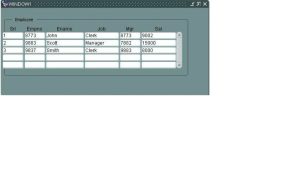
The first column Srl(Serial No) showing the sequence. You can run your application to see the output.
